Clayzone Keynote Template: A Comprehensive Design Toolkit
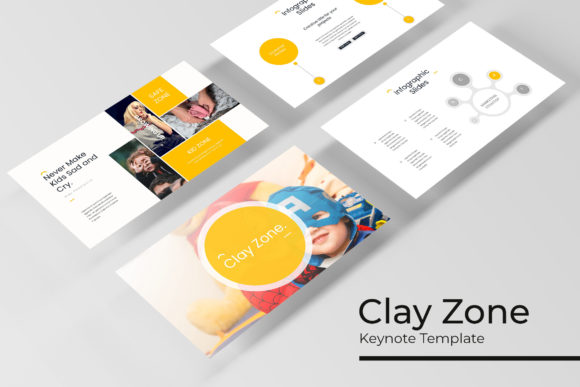
Imagine opening your design software and having a complete, professionally crafted presentation system ready to go. That's the core promise of the Clayzone Keynote Template, a robust design asset built for creators who need both visual impact and practical efficiency. It moves beyond a single slide deck, offering a structured framework that adapts to diverse creative needs.
What Makes This Template System Stand Out?
At its heart, the Clayzone Keynote Template is about organized flexibility. It includes over 150 total slides, meticulously divided across five premade color schemes. Each color theme provides 30 unique slides, ensuring you have a cohesive visual story for any project. This structure eliminates the guesswork of matching colors and layouts, allowing you to focus on your content.
The design philosophy centers on modern typography and clean, editable graphics. Every element, from the handcrafted infographics to the section break slides, is built on master slides. This means you can change a font or color once and see it update across your entire presentation, maintaining perfect visual consistency—a crucial factor for strong brand identity.
Practical Applications for Designers and Creators
This toolkit shines in numerous professional scenarios. Consider these practical use cases:
- Client Presentations and Pitches: Build a polished, persuasive deck quickly using the pre-designed layouts for data, timelines, and team introductions.
- Portfolio Showcases: Utilize the dedicated gallery and portfolio slides to display work in a clean, focused manner that lets your projects speak for themselves.
- Internal Reports and Workshops: The clear infographic slides help translate complex data into digestible, visually engaging information.
- Brand Guidelines Decks: Systematically present your brand's typography, color palette, and imagery rules with a template that itself embodies professional design standards.
Key Features for a Streamlined Workflow
Efficiency is built into every aspect. The picture placeholders are fully resizable and editable, designed for simple drag-and-drop functionality. You don't need to spend time cropping or adjusting images to fit a frame. Furthermore, all graphics are pixel-perfect illustrations, ensuring your presentation looks sharp on any screen, from a laptop to a large monitor.
The package is comprehensive, including five KEY files for standard and widescreen formats, along with a helpful readme file. A notable inclusion is the link to download the free font used, removing a common hurdle in finalizing design assets. This attention to detail makes the Clayzone Keynote Template a true end-to-end solution.
Tips for Maximizing Your Template
To get the most out of a premium asset like this, keep these pointers in mind:
- Test Your Content Early: Before committing to a color scheme, drop your core text and images into a few key slides to see which theme complements your material best.
- Customize with Purpose: Use the master slides to adjust fonts and colors, but do so to align with your existing brand guidelines or the project's specific mood.
- Combine with Other Design Assets: Pair the template's clean typography with your own logo design or unique social media graphics to create a fully integrated visual language.
Choosing the right design assets is about finding tools that elevate your work and respect your time. The Clayzone Keynote Template offers a rare blend of creative depth and practical utility. It provides the structure of a professional system while giving you the control to make every presentation uniquely yours, ensuring your ideas are communicated with clarity and visual sophistication.